
How to Remove Text from a Photo Without Blurring It
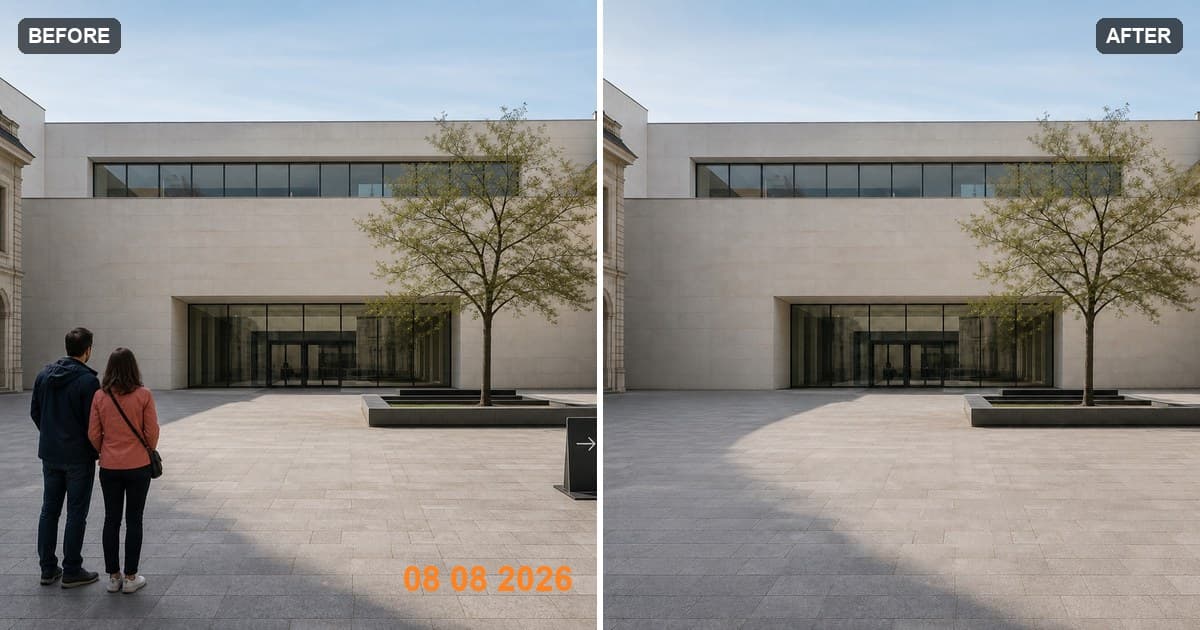
Text removal works best when you can answer one question: what should be behind the letters? Orange date digits over an empty patch of pavement are straightforward. A caption crossing someone's face is not.
The example above deliberately shows both cases in one frame. The date sits on a simple floor texture, while the people cover a much larger area. If you only want to remove the date, brush the digits and leave the people alone. A smaller task gives the tool more real background to work with.
Open the object remover when you are ready to try it. You can upload and mark the text before signing in.
How to remove words from a picture
1. Check the background under the words
Text over sky, a painted wall, fabric, sand, or a soft gradient is a good candidate. Text crossing a face, a detailed logo, a railing, or several different surfaces is harder because the missing structure has to be generated rather than revealed.
The editor accepts JPG, PNG, WebP, HEIC, and HEIF files up to 30 MB. It works on a 1200 × 760 canvas and exports PNG, so keep the original if you need its exact native dimensions later.
2. Use a brush slightly wider than each stroke
Cover every letter and add a narrow margin around its hard edge. If you can still see part of a serif, outline, or drop shadow through the mask, it will probably remain in the result.
For a short date, one compact mask is fine. For a long caption crossing several backgrounds, split the line where the background changes. Clean the section over the wall first, inspect it, and then handle the section over the floor or clothing.
3. Compare the result at the edges
Confirm the cleanup when the mask is ready. The useful places to inspect are not the middle of the removed word; they are the joins where a letter crossed a horizon, window frame, seam, or strong change in color.
If one fragment remains, select only that fragment for the next pass. Repainting the whole line can disturb an area that already looks right.
4. Download with the limits understood
less.pictures downloads a PNG from its working canvas and does not add its own watermark. Each account gets one successful cleanup free; later successful cleanups use 20 credits. A completed result counts as a cleanup, while a provider failure restores the free use or refunds the credits.
Which kinds of text are easiest to remove?
Camera dates and timestamps. These are often small, isolated, and placed over pavement or a dark corner. Include any glow or outline around the digits.
Captions and subtitles. Brush the letters and the semi-transparent caption bar if that bar should disappear too. If the bar covers detailed faces or clothing, expect the reconstruction to be less predictable.
Labels and price tags. When the label is a physical object, remove the card, string, pin, clip, and connected shadow—not just the printed words. The product-photo cleanup guide has a worked example.
Signs in the background. Decide whether you want to erase the lettering or the entire sign. Removing the whole sign is often more coherent than leaving a blank board. The broader object-removal guide explains how to handle poles, edges, and shadows.
Blur, crop, or reconstruct?
Blur is useful when the goal is privacy, such as hiding a name or license plate. It makes the concealment obvious, which is often exactly what you want. Cropping is even simpler when the text sits near an unimportant edge.
Reconstruction makes sense when you own the image, want to preserve the framing, and have enough nearby background to create a believable fill. It is not automatically the right choice for every photo.
A note about ownership marks
Use the tool on photos you own or are allowed to edit. Removing a date you added, a temporary caption, or a label in your own product shot is ordinary cleanup. Stripping an ownership mark from someone else's work is not.
Common questions
Can I remove handwritten words? Yes, if the background around the handwriting provides enough context. Include every stroke and its shadow or indentation where visible.
Can I remove text from a screenshot? You can, but reconstruction is not always the best method. A flat interface may fill cleanly; text crossing icons, controls, or other content will require the tool to invent those missing details.
What if a person is the main distraction? Use the separate guide on removing a person from a photo. A person-sized selection needs different care around shadows, feet, and overlapping subjects.
Is the text remover free? The first successful cleanup on each account is free. After that, each successful cleanup uses 20 credits. Uploading and brushing do not consume the free use or credits.
Open the object remover and start with the smallest complete text selection.